|

|
pylab_examples_Examples 75_stackplot_demo. |
H.Kamifuji . |
- stackplot_demo.py
import numpy as np
import matplotlib.pyplot as plt


def fnx():
    return np.random.randint(5, 50, 10)

y = np.row_stack((fnx(), fnx(), fnx()))
x = np.arange(10)

y1, y2, y3 = fnx(), fnx(), fnx()

fig, ax = plt.subplots()
ax.stackplot(x, y)
plt.show()

fig, ax = plt.subplots()
ax.stackplot(x, y1, y2, y3)
plt.show()
- 実行結果( stackplot_demo.png )
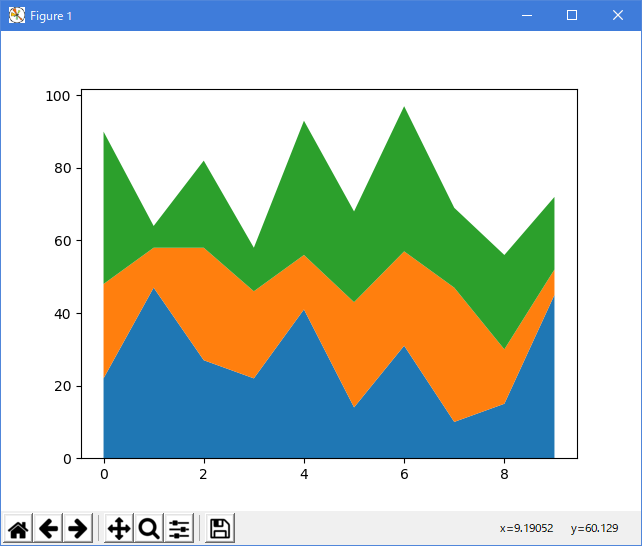
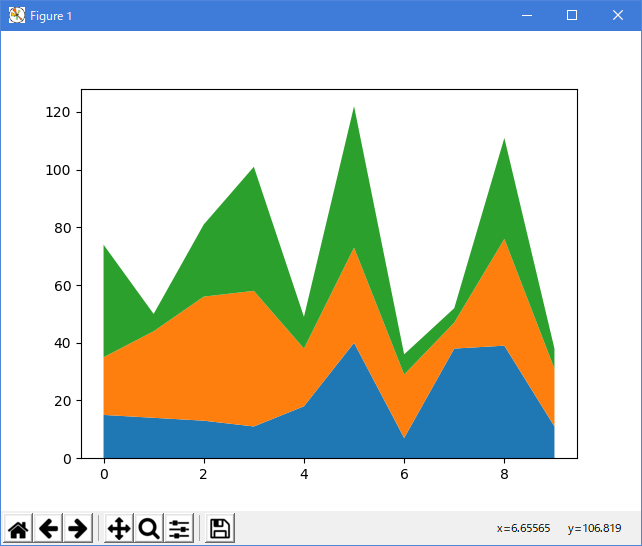
Windows Python 3.14.6 (matplotlib 3.11.1) では、下記のようなエラーがあり、実行できない。
2026/08/25 改修追記
Traceback (most recent call last): File "D:___\stackplot_demo.py", line 8, in
Linux Python3 3.8.6 (matplotlib 3.3.3) では、正常に、実行できる。y = np.row_stack((fnx(), fnx(), fnx())) ^^^^^^^^^^^^ File "C:___\AppData\Local\Python\pythoncore-3.14-64\ Lib\site-packages\numpy\__init__.py", line 782, in __getattr__ raise AttributeError(f"module {__name__!r} has no attribute {attr!r}") AttributeError: module 'numpy' has no attribute 'row_stack'
対策案として、(matplotlib 3.11.1) の Example (stackplot_demo_2.py) を、ダウンロードした。
"""
===========================
Stackplots and streamgraphs
===========================
"""

# %%
# Stackplots
# ----------
#
# Stackplots draw multiple datasets as vertically stacked areas. This is
# useful when the individual data values and additionally their cumulative
# value are of interest.


import matplotlib.pyplot as plt
import numpy as np

import matplotlib.ticker as mticker

# data from United Nations World Population Prospects (Revision 2019)
# https://population.un.org/wpp/, license: CC BY 3.0 IGO
year = [1950, 1960, 1970, 1980, 1990, 2000, 2010, 2018]
population_by_continent = {
    'Africa': [.228, .284, .365, .477, .631, .814, 1.044, 1.275],
    'the Americas': [.340, .425, .519, .619, .727, .840, .943, 1.006],
    'Asia': [1.394, 1.686, 2.120, 2.625, 3.202, 3.714, 4.169, 4.560],
    'Europe': [.220, .253, .276, .295, .310, .303, .294, .293],
    'Oceania': [.012, .015, .019, .022, .026, .031, .036, .039],
}

fig, ax = plt.subplots()
ax.stackplot(year, population_by_continent.values(),
             labels=population_by_continent.keys(), alpha=0.8)
ax.legend(loc='upper left', reverse=True)
ax.set_title('World population')
ax.set_xlabel('Year')
ax.set_ylabel('Number of people (billions)')
# add tick at every 200 million people
ax.yaxis.set_minor_locator(mticker.MultipleLocator(.2))

plt.show()

# %%
# Streamgraphs
# ------------
#
# Using the *baseline* parameter, you can turn an ordinary stacked area plot
# with baseline 0 into a stream graph.


# Fixing random state for reproducibility
np.random.seed(19680801)


def gaussian_mixture(x, n=5):
    """Return a random mixture of *n* Gaussians, evaluated at positions *x*."""
    def add_random_gaussian(a):
        amplitude = 1 / (.1 + np.random.random())
        dx = x[-1] - x[0]
        x0 = (2 * np.random.random() - .5) * dx
        z = 10 / (.1 + np.random.random()) / dx
        a += amplitude * np.exp(-(z * (x - x0))**2)
    a = np.zeros_like(x)
    for j in range(n):
        add_random_gaussian(a)
    return a


x = np.linspace(0, 100, 101)
ys = [gaussian_mixture(x) for _ in range(3)]

fig, ax = plt.subplots()
ax.stackplot(x, ys, baseline='wiggle')
plt.show()

# %%
# .. tags::
#
#    plot-type: stackplot
#    level: intermediate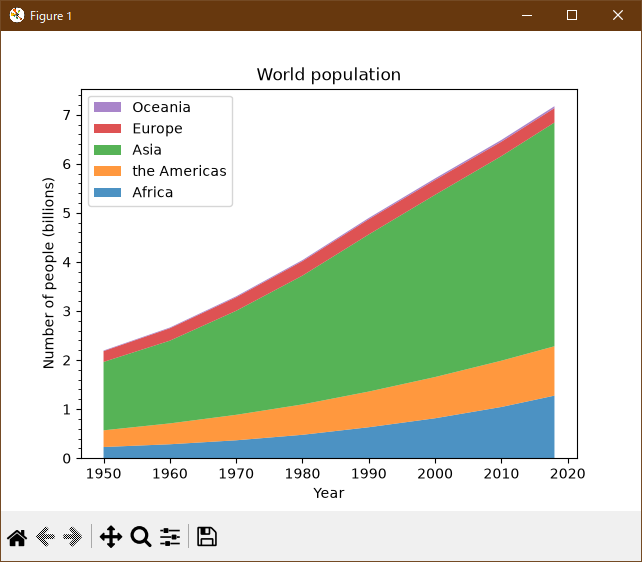
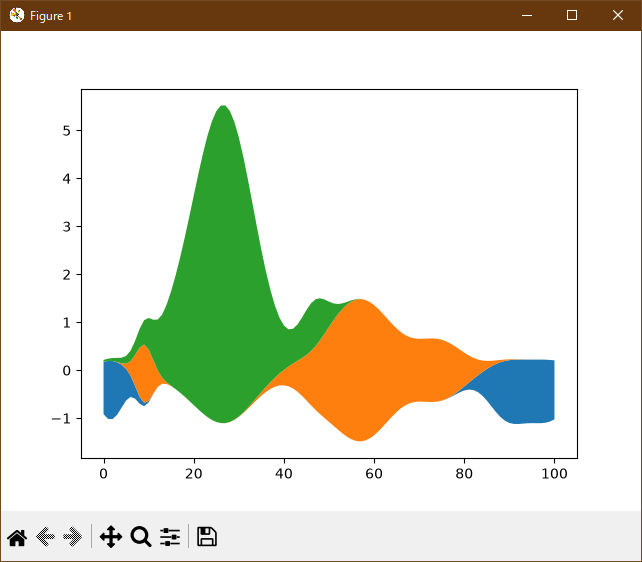
Windows Python 3.14.6 (matplotlib 3.11.1) では、正常に、実行できる。
Linux Python3 3.8.6 (matplotlib 3.3.3) では、下記のようなエラーがあり、実行できない。
Traceback (most recent call last):
  File "stackplot_demo_2.py", line 35, in
    ax.legend(loc='upper left', reverse=True)
  File "/home/wwwadmin/.local/lib/python3.6/site-packages/matplotlib/axes/_axes.py", line 417, in legend
    self.legend_ = mlegend.Legend(self, handles, labels, **kwargs)
TypeError: __init__() got an unexpected keyword argument 'reverse'
- 参照ページ
pylab_examples_Examples code: stackplot_demo.py
- リリースノート
- 2026/08/25 Ver=1.04 Windows Python 3.14.6 と Linux Pyson3 3.8.6 で確認
- 2023/04/03 Ver=1.03 Python 3.11.2 で確認
- 2020/11/01 Ver=1.01 Python 3.7.8 で確認
- 2018/12/04 Ver=1.01 初版リリース
- 関連ページ