|

|
pylab_examples_Examples 59_demo_text_path. |
H.Kamifuji . |
- demo_text_path.py
この事例は、Windows10_1909 で Python 3.9.0 環境では、動作しません。( from matplotlib._png import read_png が削除されたのか? )
# -*- coding: utf-8 -*-

import matplotlib.pyplot as plt
from matplotlib.image import BboxImage
import numpy as np
from matplotlib.transforms import IdentityTransform

import matplotlib.patches as mpatches

from matplotlib.offsetbox import AnnotationBbox,\
    AnchoredOffsetbox, AuxTransformBox

from matplotlib.cbook import get_sample_data

from matplotlib.text import TextPath


class PathClippedImagePatch(mpatches.PathPatch):
    """
    The given image is used to draw the face of the patch. Internally,
    it uses BboxImage whose clippath set to the path of the patch.

    FIXME : The result is currently dpi dependent.
    """

    def __init__(self, path, bbox_image, **kwargs):
        mpatches.PathPatch.__init__(self, path, **kwargs)
        self._init_bbox_image(bbox_image)

    def set_facecolor(self, color):
        """simply ignore facecolor"""
        mpatches.PathPatch.set_facecolor(self, "none")

    def _init_bbox_image(self, im):

        bbox_image = BboxImage(self.get_window_extent,
                               norm=None,
                               origin=None,
                               )
        bbox_image.set_transform(IdentityTransform())

        bbox_image.set_data(im)
        self.bbox_image = bbox_image

    def draw(self, renderer=None):

        # the clip path must be updated every draw. any solution? -JJ
        self.bbox_image.set_clip_path(self._path, self.get_transform())
        self.bbox_image.draw(renderer)

        mpatches.PathPatch.draw(self, renderer)


if 1:

    usetex = plt.rcParams["text.usetex"]

    fig = plt.figure(1)

    # EXAMPLE 1

    ax = plt.subplot(211)

    from matplotlib._png import read_png
    fn = get_sample_data("grace_hopper.png", asfileobj=False)
    arr = read_png(fn)

    text_path = TextPath((0, 0), "!?", size=150)
    p = PathClippedImagePatch(text_path, arr, ec="k",
                              transform=IdentityTransform())

    #p.set_clip_on(False)

    # make offset box
    offsetbox = AuxTransformBox(IdentityTransform())
    offsetbox.add_artist(p)

    # make anchored offset box
    ao = AnchoredOffsetbox(loc=2, child=offsetbox, frameon=True, borderpad=0.2)
    ax.add_artist(ao)

    # another text
    from matplotlib.patches import PathPatch
    if usetex:
        r = r"\mbox{textpath supports mathtext \& \TeX}"
    else:
        r = r"textpath supports mathtext & TeX"

    text_path = TextPath((0, 0), r,
                         size=20, usetex=usetex)

    p1 = PathPatch(text_path, ec="w", lw=3, fc="w", alpha=0.9,
                   transform=IdentityTransform())
    p2 = PathPatch(text_path, ec="none", fc="k",
                   transform=IdentityTransform())

    offsetbox2 = AuxTransformBox(IdentityTransform())
    offsetbox2.add_artist(p1)
    offsetbox2.add_artist(p2)

    ab = AnnotationBbox(offsetbox2, (0.95, 0.05),
                        xycoords='axes fraction',
                        boxcoords="offset points",
                        box_alignment=(1., 0.),
                        frameon=False
                        )
    ax.add_artist(ab)

    ax.imshow([[0, 1, 2], [1, 2, 3]], cmap=plt.cm.gist_gray_r,
              interpolation="bilinear",
              aspect="auto")

    # EXAMPLE 2

    ax = plt.subplot(212)

    arr = np.arange(256).reshape(1, 256)/256.

    if usetex:
        s = r"$\displaystyle\left[\sum_{n=1}^\infty\frac{-e^{i\pi}}{2^n}\right]$!"
    else:
        s = r"$\left[\sum_{n=1}^\infty\frac{-e^{i\pi}}{2^n}\right]$!"
    text_path = TextPath((0, 0), s, size=40, usetex=usetex)
    text_patch = PathClippedImagePatch(text_path, arr, ec="none",
                                       transform=IdentityTransform())

    shadow1 = mpatches.Shadow(text_patch, 1, -1, props=dict(fc="none", ec="0.6", lw=3))
    shadow2 = mpatches.Shadow(text_patch, 1, -1, props=dict(fc="0.3", ec="none"))

    # make offset box
    offsetbox = AuxTransformBox(IdentityTransform())
    offsetbox.add_artist(shadow1)
    offsetbox.add_artist(shadow2)
    offsetbox.add_artist(text_patch)

    # place the anchored offset box using AnnotationBbox
    ab = AnnotationBbox(offsetbox, (0.5, 0.5),
                        xycoords='data',
                        boxcoords="offset points",
                        box_alignment=(0.5, 0.5),
                        )
    #text_path.set_size(10)

    ax.add_artist(ab)

    ax.set_xlim(0, 1)
    ax.set_ylim(0, 1)

    plt.draw()
    plt.show()
- 実行結果( demo_text_path.png )
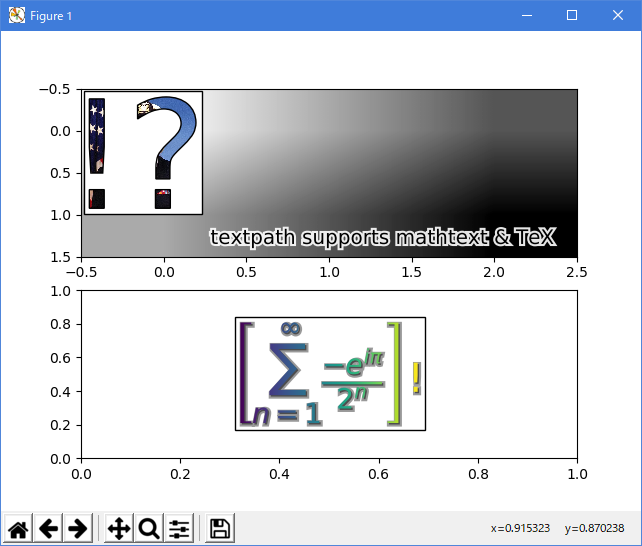
Python 3.11.2 見直しました。上記のコードでは、下記のエラーが発生します。
Traceback (most recent call last):
File "_:\demo_text_path.py", line 64, in <module>
from matplotlib._png import read_png
ModuleNotFoundError: No module named 'matplotlib._png'
matplotlib 内部のエラーのようです。matplotlib の改修(先祖帰りバグの改修)を待つしかない。
Python 3.11.6 (matplotlib 3.7.1) では、下記のようなエラーがあり、実行できない。
Traceback (most recent call last): File "M:\______\demo_text_path.py", line 64, in
Python 3.12.0 (matplotlib 3.8.1) では、下記のようなエラーがあり、実行できない。from matplotlib._png import read_png ModuleNotFoundError: No module named 'matplotlib._png'
Traceback (most recent call last): File "E:\______\demo_text_path.py", line 64, in
Python 3.11.6 (matplotlib 3.7.1) 及び Python 3.12.0 (matplotlib 3.8.1) で、見直し中、新しいサンプル(text-labels-and-annotations-demo-text-path-py) を見つけ、下記のコードで、確認できました。from matplotlib._png import read_png ModuleNotFoundError: No module named 'matplotlib._png'
"""
======================
Using a text as a Path
======================

`~matplotlib.text.TextPath` creates a `.Path` that is the outline of the
characters of a text. The resulting path can be employed e.g. as a clip path
for an image.
"""

import matplotlib.pyplot as plt
import numpy as np

from matplotlib.cbook import get_sample_data
from matplotlib.image import BboxImage
from matplotlib.offsetbox import (AnchoredOffsetbox, AnnotationBbox,
                                  AuxTransformBox)
from matplotlib.patches import PathPatch, Shadow
from matplotlib.text import TextPath
from matplotlib.transforms import IdentityTransform


class PathClippedImagePatch(PathPatch):
    """
    The given image is used to draw the face of the patch. Internally,
    it uses BboxImage whose clippath set to the path of the patch.

    FIXME : The result is currently dpi dependent.
    """

    def __init__(self, path, bbox_image, **kwargs):
        super().__init__(path, **kwargs)
        self.bbox_image = BboxImage(
            self.get_window_extent, norm=None, origin=None)
        self.bbox_image.set_data(bbox_image)

    def set_facecolor(self, color):
        """Simply ignore facecolor."""
        super().set_facecolor("none")

    def draw(self, renderer=None):
        # the clip path must be updated every draw. any solution? -JJ
        self.bbox_image.set_clip_path(self._path, self.get_transform())
        self.bbox_image.draw(renderer)
        super().draw(renderer)


if __name__ == "__main__":

    fig, (ax1, ax2) = plt.subplots(2)

    # EXAMPLE 1

    arr = plt.imread(get_sample_data("grace_hopper.jpg"))

    text_path = TextPath((0, 0), "!?", size=150)
    p = PathClippedImagePatch(text_path, arr, ec="k")

    # make offset box
    offsetbox = AuxTransformBox(IdentityTransform())
    offsetbox.add_artist(p)

    # make anchored offset box
    ao = AnchoredOffsetbox(loc='upper left', child=offsetbox, frameon=True,
                           borderpad=0.2)
    ax1.add_artist(ao)

    # another text
    for usetex, ypos, string in [
            (False, 0.25, r"textpath supports mathtext"),
            (True, 0.05, r"textpath supports \TeX"),
    ]:
        text_path = TextPath((0, 0), string, size=20, usetex=usetex)

        p1 = PathPatch(text_path, ec="w", lw=3, fc="w", alpha=0.9)
        p2 = PathPatch(text_path, ec="none", fc="k")

        offsetbox2 = AuxTransformBox(IdentityTransform())
        offsetbox2.add_artist(p1)
        offsetbox2.add_artist(p2)

        ab = AnnotationBbox(offsetbox2, (0.95, ypos),
                            xycoords='axes fraction',
                            boxcoords="offset points",
                            box_alignment=(1., 0.),
                            frameon=False,
                            )
        ax1.add_artist(ab)

    ax1.imshow([[0, 1, 2], [1, 2, 3]], cmap=plt.cm.gist_gray_r,
               interpolation="bilinear", aspect="auto")

    # EXAMPLE 2

    arr = np.arange(256).reshape(1, 256)

    for usetex, xpos, string in [
            (False, 0.25,
             r"$\left[\sum_{n=1}^\infty\frac{-e^{i\pi}}{2^n}\right]$!"),
            (True, 0.75,
             r"$\displaystyle\left[\sum_{n=1}^\infty"
             r"\frac{-e^{i\pi}}{2^n}\right]$!"),
    ]:
        text_path = TextPath((0, 0), string, size=40, usetex=usetex)
        text_patch = PathClippedImagePatch(text_path, arr, ec="none")
        shadow1 = Shadow(text_patch, 1, -1, fc="none", ec="0.6", lw=3)
        shadow2 = Shadow(text_patch, 1, -1, fc="0.3", ec="none")

        # make offset box
        offsetbox = AuxTransformBox(IdentityTransform())
        offsetbox.add_artist(shadow1)
        offsetbox.add_artist(shadow2)
        offsetbox.add_artist(text_patch)

        # place the anchored offset box using AnnotationBbox
        ab = AnnotationBbox(offsetbox, (xpos, 0.5), box_alignment=(0.5, 0.5))

        ax2.add_artist(ab)

    ax2.set_xlim(0, 1)
    ax2.set_ylim(0, 1)

    plt.show()
Python 3.11.6 (matplotlib 3.7.1) では、下記のようなエラーがあり、実行できない。
Traceback (most recent call last): File "C:\Users\______\AppData\Local\Programs\Python\Python311\Lib \site-packages\matplotlib\texmanager.py", line 255, in _run_checked_subprocess report = subprocess.check_output( ^^^^^^^^^^^^^^^^^^^^^^^^ File "C:\Users\______\AppData\Local\Programs\Python\Python311\Lib\subprocess.py", line 466, in check_output return run(*popenargs, stdout=PIPE, timeout=timeout, check=True, ^^^^^^^^^^^^^^^^^^^^^^^^^^^^^^^^^^^^^^^^^^^^^^^^^^^^^^^^^ File "C:\Users\______\AppData\Local\Programs\Python\Python311\Lib\subprocess.py", line 548, in run with Popen(*popenargs, **kwargs) as process: ^^^^^^^^^^^^^^^^^^^^^^^^^^^ File "C:\Users\______\AppData\Local\Programs\Python\Python311\Lib\subprocess.py", line 1026, in __init__ self._execute_child(args, executable, preexec_fn, close_fds, File "C:\Users\______\AppData\Local\Programs\Python\Python311\Lib\subprocess.py", line 1538, in _execute_child hp, ht, pid, tid = _winapi.CreateProcess(executable, args, ^^^^^^^^^^^^^^^^^^^^^^^^^^^^^^^^^^^^^^^ FileNotFoundError: [WinError 2] 指定されたファイルが見つかりません。 The above exception was the direct cause of the following exception: Traceback (most recent call last): File "M:\______\59_demo_text_path\demo_text_path_2.py", line 73, inPython 3.12.0 (matplotlib 3.8.1) では、下記のようなエラーがあり、実行できない。text_path = TextPath((0, 0), string, size=20, usetex=usetex) ^^^^^^^^^^^^^^^^^^^^^^^^^^^^^^^^^^^^^^^^^^^^^^^^ File "C:\Users\______\AppData\Local\Programs\Python\Python311\Lib \site-packages\matplotlib\textpath.py", line 366, in __init__ *text_to_path.get_text_path(prop, s, ismath=ismath), ^^^^^^^^^^^^^^^^^^^^^^^^^^^^^^^^^^^^^^^^^^^^^^^^^^ File "C:\Users\______\AppData\Local\Programs\Python\Python311\Lib \site-packages\matplotlib\textpath.py", line 113, in get_text_path glyph_info, glyph_map, rects = self.get_glyphs_tex(prop, s) ^^^^^^^^^^^^^^^^^^^^^^^^^^^^ File "C:\Users\______\AppData\Local\Programs\Python\Python311\Lib \site-packages\matplotlib\textpath.py", line 230, in get_glyphs_tex dvifile = TexManager().make_dvi(s, self.FONT_SCALE) ^^^^^^^^^^^^^^^^^^^^^^^^^^^^^^^^^^^^^^^^^ File "C:\Users\______\AppData\Local\Programs\Python\Python311\Lib \site-packages\matplotlib\texmanager.py", line 300, in make_dvi cls._run_checked_subprocess( File "C:\Users\______\AppData\Local\Programs\Python\Python311\Lib \site-packages\matplotlib\texmanager.py", line 259, in _run_checked_subprocess raise RuntimeError( RuntimeError: Failed to process string with tex because latex could not be found
Traceback (most recent call last): File "C:\Program Files\Python312\Lib\site-packages\matplotlib\texmanager.py", line 250, in _run_checked_subprocess report = subprocess.check_output( ^^^^^^^^^^^^^^^^^^^^^^^^ File "C:\Program Files\Python312\Lib\subprocess.py", line 466, in check_output return run(*popenargs, stdout=PIPE, timeout=timeout, check=True, ^^^^^^^^^^^^^^^^^^^^^^^^^^^^^^^^^^^^^^^^^^^^^^^^^^^^^^^^^ File "C:\Program Files\Python312\Lib\subprocess.py", line 548, in run with Popen(*popenargs, **kwargs) as process: ^^^^^^^^^^^^^^^^^^^^^^^^^^^ File "C:\Program Files\Python312\Lib\subprocess.py", line 1026, in __init__ self._execute_child(args, executable, preexec_fn, close_fds, File "C:\Program Files\Python312\Lib\subprocess.py", line 1538, in _execute_child hp, ht, pid, tid = _winapi.CreateProcess(executable, args, ^^^^^^^^^^^^^^^^^^^^^^^^^^^^^^^^^^^^^^^ FileNotFoundError: [WinError 2] 指定されたファイルが見つかりません。 The above exception was the direct cause of the following exception: Traceback (most recent call last): File "E:\E_Home\usr\Python\Py-Support\64_pylab_examples_Examples\02_\59_demo_text_path\demo_text_path_2.py", line 73, in当方の環境には、LaTeX をインストールしてないので、確認できない。text_path = TextPath((0, 0), string, size=20, usetex=usetex) ^^^^^^^^^^^^^^^^^^^^^^^^^^^^^^^^^^^^^^^^^^^^^^^^ File "C:\Program Files\Python312\Lib\site-packages\matplotlib\textpath.py", line 355, in __init__ *text_to_path.get_text_path(prop, s, ismath=ismath), ^^^^^^^^^^^^^^^^^^^^^^^^^^^^^^^^^^^^^^^^^^^^^^^^^^ File "C:\Program Files\Python312\Lib\site-packages\matplotlib\textpath.py", line 109, in get_text_path glyph_info, glyph_map, rects = self.get_glyphs_tex(prop, s) ^^^^^^^^^^^^^^^^^^^^^^^^^^^^ File "C:\Program Files\Python312\Lib\site-packages\matplotlib\textpath.py", line 219, in get_glyphs_tex dvifile = TexManager().make_dvi(s, self.FONT_SCALE) ^^^^^^^^^^^^^^^^^^^^^^^^^^^^^^^^^^^^^^^^^ File "C:\Program Files\Python312\Lib\site-packages\matplotlib\texmanager.py", line 295, in make_dvi cls._run_checked_subprocess( File "C:\Program Files\Python312\Lib\site-packages\matplotlib\texmanager.py", line 254, in _run_checked_subprocess raise RuntimeError( RuntimeError: Failed to process string with tex because latex could not be found
- 参照ページ
pylab_examples_Examples code: demo_text_path.py
text-labels-and-annotations-demo-text-path-py
- リリースノート
- 2023/11/25 Ver=1.04 Python 3.12.0 (matplotlib 3.8.1)で確認
- 2023/11/25 Ver=1.04 Python 3.11.6 (matplotlib 3.7.1)で確認
- 2023/04/02 Ver=1.03 Python 3.11.2 で確認
- 2020/10/31 Ver=1.01 Python 3.7.8 で確認
- 2018/12/01 Ver=1.01 初版リリース
- 関連ページ