|

|
pylab_examples_Examples 54_date_index_formatter. |
H.Kamifuji . |
- date_index_formatter.py
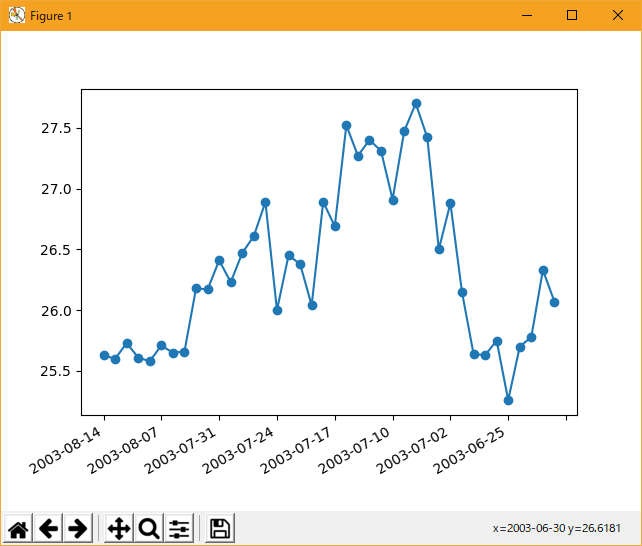
毎日のデータをプロットするとき、頻繁に要求するのは、スキップを無視してデータをプロットすることです。たとえば、週末に余分なスペースはありません。 これは特に財務時系列では一般的です. M-F ではなく、Sat、Sun ではなく、x 軸にギャップがないようにすることができます。 このアプローチは、単純に xdata の整数インデックスとカスタムティック Formatter を使用して、指定されたインデックスの適切な日付文字列を取得することです。
この事例は、Windows10_1909 で Python 3.9.0 環境では、動作しません。( from matplotlib.mlab import csv2rec が削除されたのか? )
"""
When plotting daily data, a frequent request is to plot the data
ignoring skips, e.g., no extra spaces for weekends.  This is particularly
common in financial time series, when you may have data for M-F and
not Sat, Sun and you don't want gaps in the x axis.  The approach is
to simply use the integer index for the xdata and a custom tick
Formatter to get the appropriate date string for a given index.
"""

from __future__ import print_function
import numpy as np
from matplotlib.mlab import csv2rec
import matplotlib.pyplot as plt
import matplotlib.cbook as cbook
from matplotlib.ticker import Formatter

datafile = cbook.get_sample_data('msft.csv', asfileobj=False)
print('loading %s' % datafile)
r = csv2rec(datafile)[-40:]


class MyFormatter(Formatter):
    def __init__(self, dates, fmt='%Y-%m-%d'):
        self.dates = dates
        self.fmt = fmt

    def __call__(self, x, pos=0):
        'Return the label for time x at position pos'
        ind = int(np.round(x))
        if ind >= len(self.dates) or ind < 0:
            return ''

        return self.dates[ind].strftime(self.fmt)

formatter = MyFormatter(r.date)

fig, ax = plt.subplots()
ax.xaxis.set_major_formatter(formatter)
ax.plot(np.arange(len(r)), r.close, 'o-')
fig.autofmt_xdate()
plt.show()
- 実行結果( date_index_formatter.png )
Python 3.11.2 見直しました。上記のコードでは、下記のエラーが発生します。
Traceback (most recent call last):
File "_:\date_index_formatter.py", line 12, in <module>
from matplotlib.mlab import csv2rec
ImportError: cannot import name 'csv2rec' from 'matplotlib.mlab' (C:\Users\kamif\AppData\Local\Programs\Python\Python311\Lib\site-packages\matplotlib\mlab.py)
matplotlib 内部のエラーのようです。matplotlib の改修(先祖帰りバグの改修)を待つしかない。
Python 3.11.6 (matplotlib 3.7.1) では、下記のようなエラーがあり、実行できない。
Traceback (most recent call last): File "M:\______\date_index_formatter.py", line 12, in
Python 3.12.0 (matplotlib 3.8.1) では、下記のようなエラーがあり、実行できない。from matplotlib.mlab import csv2rec ImportError: cannot import name 'csv2rec' from 'matplotlib.mlab' (C:\Users\______\AppData\Local\Programs\Python\Python311\Lib\site-packages\matplotlib\mlab.py)
Traceback (most recent call last): File "E:\______\date_index_formatter.py", line 12, in
Python 3.11.6 (matplotlib 3.7.1) 及び Python 3.12.0 (matplotlib 3.8.1) で、見直し中、新しいサンプル(ticks-date-index-formatter-py) を見つけ、下記のコードで、正常に実行できました。from matplotlib.mlab import csv2rec ImportError: cannot import name 'csv2rec' from 'matplotlib.mlab' (C:\Program Files\Python312\Lib\site-packages\matplotlib\mlab.py)
"""
=====================================
Custom tick formatter for time series
=====================================

.. redirect-from:: /gallery/text_labels_and_annotations/date_index_formatter
.. redirect-from:: /gallery/ticks/date_index_formatter2

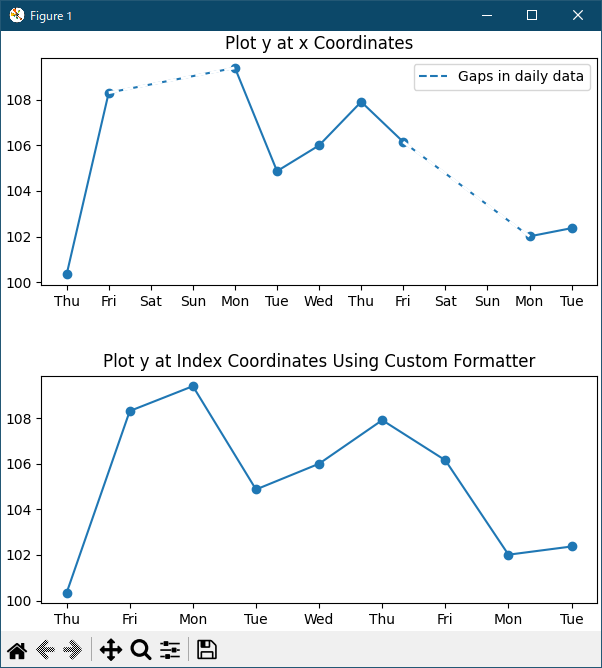
When plotting daily data, e.g., financial time series, one often wants
to leave out days on which there is no data, for instance weekends, so that
the data are plotted at regular intervals without extra spaces for the days
with no data.
The example shows how to use an 'index formatter' to achieve the desired plot.
"""

import matplotlib.pyplot as plt
import numpy as np

import matplotlib.cbook as cbook
from matplotlib.dates import DateFormatter, DayLocator
import matplotlib.lines as ml
from matplotlib.ticker import Formatter

# Load a structured numpy array from yahoo csv data with fields date, open, high,
# low, close, volume, adj_close from the mpl-data/sample_data directory. The
# record array stores the date as an np.datetime64 with a day unit ('D') in
# the date column (``r['date']``).
r = cbook.get_sample_data('goog.npz')['price_data']
r = r[:9]  # get the first 9 days

fig, (ax1, ax2) = plt.subplots(nrows=2, figsize=(6, 6), layout='constrained')
fig.get_layout_engine().set(hspace=0.15)

# First we'll do it the default way, with gaps on weekends
ax1.plot(r["date"], r["adj_close"], 'o-')

# Highlight gaps in daily data
gaps = np.flatnonzero(np.diff(r["date"]) > np.timedelta64(1, 'D'))
for gap in r[['date', 'adj_close']][np.stack((gaps, gaps + 1)).T]:
    ax1.plot(gap['date'], gap['adj_close'], 'w--', lw=2)
ax1.legend(handles=[ml.Line2D([], [], ls='--', label='Gaps in daily data')])

ax1.set_title("Plot y at x Coordinates")
ax1.xaxis.set_major_locator(DayLocator())
ax1.xaxis.set_major_formatter(DateFormatter('%a'))


# Next we'll write a custom index formatter. Below we will plot
# the data against an index that goes from 0, 1,  ... len(data).  Instead of
# formatting the tick marks as integers, we format as times.
def format_date(x, _):
    try:
        # convert datetime64 to datetime, and use datetime's strftime:
        return r["date"][round(x)].item().strftime('%a')
    except IndexError:
        pass

# Create an index plot (x defaults to range(len(y)) if omitted)
ax2.plot(r["adj_close"], 'o-')

ax2.set_title("Plot y at Index Coordinates Using Custom Formatter")
ax2.xaxis.set_major_formatter(format_date)  # internally creates FuncFormatter

# %%
# Instead of passing a function into `.Axis.set_major_formatter` you can use
# any other callable, e.g. an instance of a class that implements __call__:


class MyFormatter(Formatter):
    def __init__(self, dates, fmt='%a'):
        self.dates = dates
        self.fmt = fmt

    def __call__(self, x, pos=0):
        """Return the label for time x at position pos."""
        try:
            return self.dates[round(x)].item().strftime(self.fmt)
        except IndexError:
            pass


ax2.xaxis.set_major_formatter(MyFormatter(r["date"], '%a'))

plt.show()
Python 3.11.6 (matplotlib 3.7.1) では、下記のようなエラーがあり、実行できない。
M:\______\date_index_formatter_2.py:28: MatplotlibDeprecationWarning: In a future release, get_sample_data will automatically load numpy arrays. Set np_load to True to get the array and suppress this warning. Set asfileobj to False to get the path to the data file and suppress this warning. r = cbook.get_sample_data('goog.npz')['price_data'] Traceback (most recent call last): File "M:\______\date_index_formatter_2.py", line 28, inPython 3.12.0 (matplotlib 3.8.1) は、正常実行です。r = cbook.get_sample_data('goog.npz')['price_data'] ~~~~~~~~~~~~~~~~~~~~~~~~~~~~~~~~~^^^^^^^^^^^^^^ TypeError: '_io.BufferedReader' object is not subscriptable
- 参照ページ
pylab_examples_Examples code: date_index_formatter.py
ticks-date-index-formatter-py
- リリースノート
- 2023/11/24 Ver=1.04 Python 3.12.0 (matplotlib 3.8.1)で確認
- 2023/11/24 Ver=1.04 Python 3.11.6 (matplotlib 3.7.1)で確認
- 2023/04/02 Ver=1.03 Python 3.11.2 で確認
- 2020/10/31 Ver=1.01 Python 3.7.8 で確認
- 2018/12/01 Ver=1.01 初版リリース
- 関連ページ