|

|
event_handling_Examples 14_pong_gtk. |
H.Kamifuji . |
- pong_gtk.py
アニメーションの詳しいコメントやここで使用されるテクニックについては、wikiエントリを参照してください。
http://www.scipy.org/wikis/topical_software/MatplotlibAnimation
from __future__ import print_function

# For detailed comments on animation and the techniques used here, see
# the wiki entry
# http://www.scipy.org/wikis/topical_software/MatplotlibAnimation
import time

import gobject

import matplotlib
matplotlib.use('GTKAgg')

import matplotlib.pyplot as plt
import pipong


fig, ax = plt.subplots()
canvas = ax.figure.canvas


def start_anim(event):
    # gobject.idle_add(animation.draw,animation)
    gobject.timeout_add(10, animation.draw, animation)
    canvas.mpl_disconnect(start_anim.cid)

animation = pipong.Game(ax)
start_anim.cid = canvas.mpl_connect('draw_event', start_anim)


tstart = time.time()
plt.grid()  # to ensure proper background restore
plt.show()
print('FPS: %f' % animation.cnt/(time.time() - tstart))
- 実行結果( )
当方の環境では、動作しない。
Python 3.11.2 見直しました。上記のコードでは、下記のエラーが発生します。
Traceback (most recent call last):
File "_:\pong_gtk.py", line 11, in <module>
matplotlib.use('GTKAgg')
File "C:\Users\_____\AppData\Local\Programs\Python\Python311\Lib\site-packages\matplotlib\__init__.py", line 1234, in use
name = validate_backend(backend)
^^^^^^^^^^^^^^^^^^^^^^^^^
File "C:\Users\_____\AppData\Local\Programs\Python\Python311\Lib\site-packages\matplotlib\rcsetup.py", line 252, in validate_backend
else _validate_standard_backends(s))
^^^^^^^^^^^^^^^^^^^^^^^^^^^^^^
File "C:\Users\_____\AppData\Local\Programs\Python\Python311\Lib\site-packages\matplotlib\rcsetup.py", line 82, in __call__
raise ValueError(msg)
ValueError: 'gtkagg' is not a valid value for backend; supported values are ['GTK3Agg', 'GTK3Cairo', 'GTK4Agg', 'GTK4Cairo', 'MacOSX', 'nbAgg', 'QtAgg', 'QtCairo', 'Qt5Agg', 'Qt5Cairo', 'TkAgg', 'TkCairo', 'WebAgg', 'WX', 'WXAgg', 'WXCairo', 'agg', 'cairo', 'pdf', 'pgf', 'ps', 'svg', 'template']
matplotlib 内部のエラーのようです。matplotlib の改修(先祖帰りバグの改修)を待つしかない。
Python 3.11.6 (matplotlib 3.7.1) では、下記のようなエラーがあり、実行できない。
Traceback (most recent call last): File "M:\______\pong_gtk.py", line 11, in
Python 3.12.0 (matplotlib 3.8.1) では、下記のようなエラーがあり、実行できない。matplotlib.use('GTKAgg') File "C:\Users\______\AppData\Local\Programs\Python \Python311\Lib\site-packages\matplotlib\__init__.py", line 1234, in use name = validate_backend(backend) ^^^^^^^^^^^^^^^^^^^^^^^^^ File "C:\Users\_____\AppData\Local\Programs\Python \Python311\Lib\site-packages\matplotlib\rcsetup.py", line 252, in validate_backend else _validate_standard_backends(s)) ^^^^^^^^^^^^^^^^^^^^^^^^^^^^^^ File "C:\Users\______\AppData\Local\Programs\Python \Python311\Lib\site-packages\matplotlib\rcsetup.py", line 82, in __call__ raise ValueError(msg) ValueError: 'gtkagg' is not a valid value for backend; supported values are ['GTK3Agg', 'GTK3Cairo', 'GTK4Agg', 'GTK4Cairo', 'MacOSX', 'nbAgg', 'QtAgg', 'QtCairo', 'Qt5Agg', 'Qt5Cairo', 'TkAgg', 'TkCairo', 'WebAgg', 'WX', 'WXAgg', 'WXCairo', 'agg', 'cairo', 'pdf', 'pgf', 'ps', 'svg', 'template']
この matplotlib 3.8.1 バージョンで、'gobject' が削除( gtk サポート諦め?)された。
Traceback (most recent call last): File "E:\______\pong_gtk.py", line 8, in
Python 3.11.6 (matplotlib 3.7.1) 及び Python 3.12.0 (matplotlib 3.8.1) で、見直し中、同名の新しいサンプル( event-handling-pong-sgskip-py ) を見つけ、下記のコードで、正常に実行できました。import gobject ModuleNotFoundError: No module named 'gobject'
"""
====
Pong
====

A Matplotlib based game of Pong illustrating one way to write interactive
animations that are easily ported to multiple backends.

.. note::
    This example exercises the interactive capabilities of Matplotlib, and this
    will not appear in the static documentation. Please run this code on your
    machine to see the interactivity.

    You can copy and paste individual parts, or download the entire example
    using the link at the bottom of the page.
"""

import time

import matplotlib.pyplot as plt
import numpy as np
from numpy.random import randint, randn

from matplotlib.font_manager import FontProperties

instructions = """
Player A:       Player B:
  'e'      up     'i'
  'd'     down    'k'

press 't' -- close these instructions
            (animation will be much faster)
press 'a' -- add a puck
press 'A' -- remove a puck
press '1' -- slow down all pucks
press '2' -- speed up all pucks
press '3' -- slow down distractors
press '4' -- speed up distractors
press ' ' -- reset the first puck
press 'n' -- toggle distractors on/off
press 'g' -- toggle the game on/off

  """


class Pad:
    def __init__(self, disp, x, y, type='l'):
        self.disp = disp
        self.x = x
        self.y = y
        self.w = .3
        self.score = 0
        self.xoffset = 0.3
        self.yoffset = 0.1
        if type == 'r':
            self.xoffset *= -1.0

        if type == 'l' or type == 'r':
            self.signx = -1.0
            self.signy = 1.0
        else:
            self.signx = 1.0
            self.signy = -1.0

    def contains(self, loc):
        return self.disp.get_bbox().contains(loc.x, loc.y)


class Puck:
    def __init__(self, disp, pad, field):
        self.vmax = .2
        self.disp = disp
        self.field = field
        self._reset(pad)

    def _reset(self, pad):
        self.x = pad.x + pad.xoffset
        if pad.y < 0:
            self.y = pad.y + pad.yoffset
        else:
            self.y = pad.y - pad.yoffset
        self.vx = pad.x - self.x
        self.vy = pad.y + pad.w/2 - self.y
        self._speedlimit()
        self._slower()
        self._slower()

    def update(self, pads):
        self.x += self.vx
        self.y += self.vy
        for pad in pads:
            if pad.contains(self):
                self.vx *= 1.2 * pad.signx
                self.vy *= 1.2 * pad.signy
        fudge = .001
        # probably cleaner with something like...
        if self.x < fudge:
            pads[1].score += 1
            self._reset(pads[0])
            return True
        if self.x > 7 - fudge:
            pads[0].score += 1
            self._reset(pads[1])
            return True
        if self.y < -1 + fudge or self.y > 1 - fudge:
            self.vy *= -1.0
            # add some randomness, just to make it interesting
            self.vy -= (randn()/300.0 + 1/300.0) * np.sign(self.vy)
        self._speedlimit()
        return False

    def _slower(self):
        self.vx /= 5.0
        self.vy /= 5.0

    def _faster(self):
        self.vx *= 5.0
        self.vy *= 5.0

    def _speedlimit(self):
        if self.vx > self.vmax:
            self.vx = self.vmax
        if self.vx < -self.vmax:
            self.vx = -self.vmax

        if self.vy > self.vmax:
            self.vy = self.vmax
        if self.vy < -self.vmax:
            self.vy = -self.vmax


class Game:
    def __init__(self, ax):
        # create the initial line
        self.ax = ax
        ax.xaxis.set_visible(False)
        ax.set_xlim([0, 7])
        ax.yaxis.set_visible(False)
        ax.set_ylim([-1, 1])
        pad_a_x = 0
        pad_b_x = .50
        pad_a_y = pad_b_y = .30
        pad_b_x += 6.3

        # pads
        pA, = self.ax.barh(pad_a_y, .2,
                           height=.3, color='k', alpha=.5, edgecolor='b',
                           lw=2, label="Player B",
                           animated=True)
        pB, = self.ax.barh(pad_b_y, .2,
                           height=.3, left=pad_b_x, color='k', alpha=.5,
                           edgecolor='r', lw=2, label="Player A",
                           animated=True)

        # distractors
        self.x = np.arange(0, 2.22*np.pi, 0.01)
        self.line, = self.ax.plot(self.x, np.sin(self.x), "r",
                                  animated=True, lw=4)
        self.line2, = self.ax.plot(self.x, np.cos(self.x), "g",
                                   animated=True, lw=4)
        self.line3, = self.ax.plot(self.x, np.cos(self.x), "g",
                                   animated=True, lw=4)
        self.line4, = self.ax.plot(self.x, np.cos(self.x), "r",
                                   animated=True, lw=4)

        # center line
        self.centerline, = self.ax.plot([3.5, 3.5], [1, -1], 'k',
                                        alpha=.5, animated=True, lw=8)

        # puck (s)
        self.puckdisp = self.ax.scatter([1], [1], label='_nolegend_',
                                        s=200, c='g',
                                        alpha=.9, animated=True)

        self.canvas = self.ax.figure.canvas
        self.background = None
        self.cnt = 0
        self.distract = True
        self.res = 100.0
        self.on = False
        self.inst = True    # show instructions from the beginning
        self.pads = [Pad(pA, pad_a_x, pad_a_y),
                     Pad(pB, pad_b_x, pad_b_y, 'r')]
        self.pucks = []
        self.i = self.ax.annotate(instructions, (.5, 0.5),
                                  name='monospace',
                                  verticalalignment='center',
                                  horizontalalignment='center',
                                  multialignment='left',
                                  xycoords='axes fraction',
                                  animated=False)
        self.canvas.mpl_connect('key_press_event', self.on_key_press)

    def draw(self):
        draw_artist = self.ax.draw_artist
        if self.background is None:
            self.background = self.canvas.copy_from_bbox(self.ax.bbox)

        # restore the clean slate background
        self.canvas.restore_region(self.background)

        # show the distractors
        if self.distract:
            self.line.set_ydata(np.sin(self.x + self.cnt/self.res))
            self.line2.set_ydata(np.cos(self.x - self.cnt/self.res))
            self.line3.set_ydata(np.tan(self.x + self.cnt/self.res))
            self.line4.set_ydata(np.tan(self.x - self.cnt/self.res))
            draw_artist(self.line)
            draw_artist(self.line2)
            draw_artist(self.line3)
            draw_artist(self.line4)

        # pucks and pads
        if self.on:
            self.ax.draw_artist(self.centerline)
            for pad in self.pads:
                pad.disp.set_y(pad.y)
                pad.disp.set_x(pad.x)
                self.ax.draw_artist(pad.disp)

            for puck in self.pucks:
                if puck.update(self.pads):
                    # we only get here if someone scored
                    self.pads[0].disp.set_label(f"   {self.pads[0].score}")
                    self.pads[1].disp.set_label(f"   {self.pads[1].score}")
                    self.ax.legend(loc='center', framealpha=.2,
                                   facecolor='0.5',
                                   prop=FontProperties(size='xx-large',
                                                       weight='bold'))

                    self.background = None
                    self.ax.figure.canvas.draw_idle()
                    return
                puck.disp.set_offsets([[puck.x, puck.y]])
                self.ax.draw_artist(puck.disp)

        # just redraw the axes rectangle
        self.canvas.blit(self.ax.bbox)
        self.canvas.flush_events()
        if self.cnt == 50000:
            # just so we don't get carried away
            print("...and you've been playing for too long!!!")
            plt.close()

        self.cnt += 1

    def on_key_press(self, event):
        if event.key == '3':
            self.res *= 5.0
        if event.key == '4':
            self.res /= 5.0

        if event.key == 'e':
            self.pads[0].y += .1
            if self.pads[0].y < 1 - .3:
                self.pads[0].y = 1 - .3
        if event.key == 'd':
            self.pads[0].y -= .1
            if self.pads[0].y < -1:
                self.pads[0].y = -1

        if event.key == 'i':
            self.pads[1].y += .1
            if self.pads[1].y > 1 - .3:
                self.pads[1].y = 1 - .3
        if event.key == 'k':
            self.pads[1].y -= .1
            if self.pads[1].y < -1:
                self.pads[1].y = -1

        if event.key == 'a':
            self.pucks.append(Puck(self.puckdisp,
                                   self.pads[randint(2)],
                                   self.ax.bbox))
        if event.key == 'A' and len(self.pucks):
            self.pucks.pop()
        if event.key == ' ' and len(self.pucks):
            self.pucks[0]._reset(self.pads[randint(2)])
        if event.key == '1':
            for p in self.pucks:
                p._slower()
        if event.key == '2':
            for p in self.pucks:
                p._faster()

        if event.key == 'n':
            self.distract = not self.distract

        if event.key == 'g':
            self.on = not self.on
        if event.key == 't':
            self.inst = not self.inst
            self.i.set_visible(not self.i.get_visible())
            self.background = None
            self.canvas.draw_idle()
        if event.key == 'q':
            plt.close()


fig, ax = plt.subplots()
canvas = ax.figure.canvas
animation = Game(ax)

# disable the default key bindings
if fig.canvas.manager.key_press_handler_id is not None:
    canvas.mpl_disconnect(fig.canvas.manager.key_press_handler_id)


# reset the blitting background on redraw
def on_redraw(event):
    animation.background = None


# bootstrap after the first draw
def start_anim(event):
    canvas.mpl_disconnect(start_anim.cid)

    start_anim.timer.add_callback(animation.draw)
    start_anim.timer.start()
    canvas.mpl_connect('draw_event', on_redraw)


start_anim.cid = canvas.mpl_connect('draw_event', start_anim)
start_anim.timer = animation.canvas.new_timer(interval=1)

tstart = time.time()

plt.show()
print('FPS: %f' % (animation.cnt/(time.time() - tstart)))
Python 3.11.6 (matplotlib 3.7.1) 及び Python 3.12.0 (matplotlib 3.8.1) 共に、正常に、実行できる。
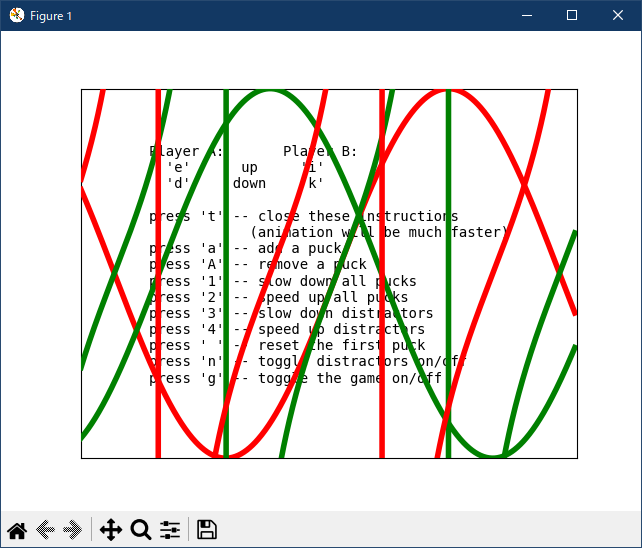
使用方法については、あまり理解しないが、取り敢えず動かしてみました。
- 参照ページ
event_handling_Examples code: pong_gtk.py
event-handling-pong-sgskip-py
- リリースノート
- 2023/11/14 Ver=1.04 Python 3.12.0 (matplotlib 3.8.1)で確認
- 2023/11/14 Ver=1.04 Python 3.11.6 (matplotlib 3.7.1)で確認
- 2023/03/29 Ver=1.03 Python 3.11.2 で確認
- 2020/10/30 Ver=1.01 Python 3.7.8 で確認
- 2018/11/25 Ver=1.01 初版リリース
- 関連ページ