|

|
event_handling_Examples 13_poly_editor. |
H.Kamifuji . |
- poly_editor.py
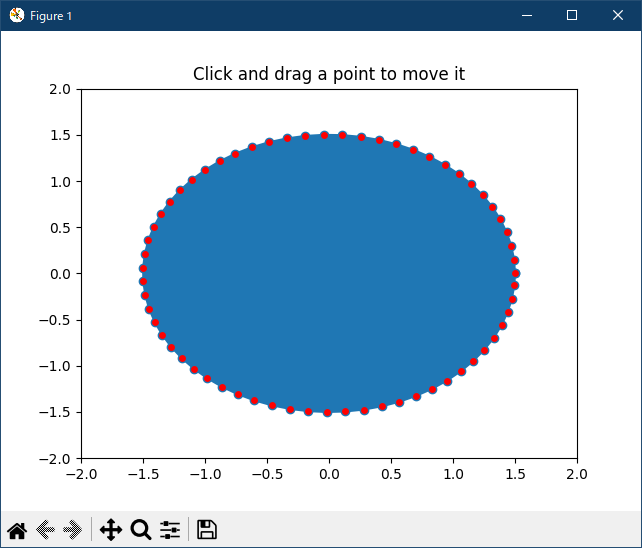
これは、matplotlib イベント処理を使用してクロスGUIアプリケーションを構築し、キャンバス上のオブジェクトと対話する方法を示す例です
この事例は、Windows10_1909 で Python 3.9.0 環境では、動作しません。( cannot import name 'dist_point_to_segment' from 'matplotlib.mlab' がデグレートしたのか? )
"""
This is an example to show how to build cross-GUI applications using
matplotlib event handling to interact with objects on the canvas

"""
import numpy as np
from matplotlib.lines import Line2D
from matplotlib.artist import Artist
from matplotlib.mlab import dist_point_to_segment


class PolygonInteractor(object):
    """
    An polygon editor.

    Key-bindings

      't' toggle vertex markers on and off.  When vertex markers are on,
          you can move them, delete them

      'd' delete the vertex under point

      'i' insert a vertex at point.  You must be within epsilon of the
          line connecting two existing vertices

    """

    showverts = True
    epsilon = 5  # max pixel distance to count as a vertex hit

    def __init__(self, ax, poly):
        if poly.figure is None:
	    raise i
	    RuntimeError('You must first add the polygon to a figure or canvas' +
	                                        ' before defining the interactor')
        self.ax = ax
        canvas = poly.figure.canvas
        self.poly = poly

        x, y = zip(*self.poly.xy)
        self.line = Line2D(x, y, marker='o', markerfacecolor='r', animated=True)
        self.ax.add_line(self.line)
        #self._update_line(poly)

        cid = self.poly.add_callback(self.poly_changed)
        self._ind = None  # the active vert

        canvas.mpl_connect('draw_event', self.draw_callback)
        canvas.mpl_connect('button_press_event', self.button_press_callback)
        canvas.mpl_connect('key_press_event', self.key_press_callback)
        canvas.mpl_connect('button_release_event', self.button_release_callback)
        canvas.mpl_connect('motion_notify_event', self.motion_notify_callback)
        self.canvas = canvas

    def draw_callback(self, event):
        self.background = self.canvas.copy_from_bbox(self.ax.bbox)
        self.ax.draw_artist(self.poly)
        self.ax.draw_artist(self.line)
        self.canvas.blit(self.ax.bbox)

    def poly_changed(self, poly):
        'this method is called whenever the polygon object is called'
        # only copy the artist props to the line (except visibility)
        vis = self.line.get_visible()
        Artist.update_from(self.line, poly)
        self.line.set_visible(vis)  # don't use the poly visibility state

    def get_ind_under_point(self, event):
        'get the index of the vertex under point if within epsilon tolerance'

        # display coords
        xy = np.asarray(self.poly.xy)
        xyt = self.poly.get_transform().transform(xy)
        xt, yt = xyt[:, 0], xyt[:, 1]
        d = np.sqrt((xt - event.x)**2 + (yt - event.y)**2)
        indseq = np.nonzero(np.equal(d, np.amin(d)))[0]
        ind = indseq[0]

        if d[ind] >= self.epsilon:
            ind = None

        return ind

    def button_press_callback(self, event):
        'whenever a mouse button is pressed'
        if not self.showverts:
            return
        if event.inaxes is None:
            return
        if event.button != 1:
            return
        self._ind = self.get_ind_under_point(event)

    def button_release_callback(self, event):
        'whenever a mouse button is released'
        if not self.showverts:
            return
        if event.button != 1:
            return
        self._ind = None

    def key_press_callback(self, event):
        'whenever a key is pressed'
        if not event.inaxes:
            return
        if event.key == 't':
            self.showverts = not self.showverts
            self.line.set_visible(self.showverts)
            if not self.showverts:
                self._ind = None
        elif event.key == 'd':
            ind = self.get_ind_under_point(event)
            if ind is not None:
                self.poly.xy = [tup for i, tup in enumerate(self.poly.xy) if i != ind]
                self.line.set_data(zip(*self.poly.xy))
        elif event.key == 'i':
            xys = self.poly.get_transform().transform(self.poly.xy)
            p = event.x, event.y  # display coords
            for i in range(len(xys) - 1):
                s0 = xys[i]
                s1 = xys[i + 1]
                d = dist_point_to_segment(p, s0, s1)
                if d <= self.epsilon:
                    self.poly.xy = np.array(
                        list(self.poly.xy[:i]) +
                        [(event.xdata, event.ydata)] +
                        list(self.poly.xy[i:]))
                    self.line.set_data(zip(*self.poly.xy))
                    break

        self.canvas.draw()

    def motion_notify_callback(self, event):
        'on mouse movement'
        if not self.showverts:
            return
        if self._ind is None:
            return
        if event.inaxes is None:
            return
        if event.button != 1:
            return
        x, y = event.xdata, event.ydata

        self.poly.xy[self._ind] = x, y
        if self._ind == 0:
            self.poly.xy[-1] = x, y
        elif self._ind == len(self.poly.xy) - 1:
            self.poly.xy[0] = x, y
        self.line.set_data(zip(*self.poly.xy))

        self.canvas.restore_region(self.background)
        self.ax.draw_artist(self.poly)
        self.ax.draw_artist(self.line)
        self.canvas.blit(self.ax.bbox)


if __name__ == '__main__':
    import matplotlib.pyplot as plt
    from matplotlib.patches import Polygon

    theta = np.arange(0, 2*np.pi, 0.1)
    r = 1.5

    xs = r*np.cos(theta)
    ys = r*np.sin(theta)

    poly = Polygon(list(zip(xs, ys)), animated=True)

    fig, ax = plt.subplots()
    ax.add_patch(poly)
    p = PolygonInteractor(ax, poly)

    #ax.add_line(p.line)
    ax.set_title('Click and drag a point to move it')
    ax.set_xlim((-2, 2))
    ax.set_ylim((-2, 2))
    plt.show()
- 実行結果( poly_editor.png )

Python 3.11.2 見直しました。上記のコードでは、下記のエラーが発生します。
Traceback (most recent call last):
File "_:\13_poly_editor\poly_editor.py", line 9, in <module>
from matplotlib.mlab import dist_point_to_segment
ImportError: cannot import name 'dist_point_to_segment' from 'matplotlib.mlab' (C:\Users\_____\AppData\Local\Programs\Python\Python311\Lib\site-packages\matplotlib\mlab.py)
matplotlib 内部のエラーのようです。matplotlib の改修(先祖帰りバグの改修)を待つしかない。
Python 3.11.6 (matplotlib 3.7.1) では、下記のようなエラーがあり、実行できない。
Traceback (most recent call last): File "M:\______\poly_editor.py", line 9, in
Python 3.12.0 (matplotlib 3.8.1) では、下記のようなエラーがあり、実行できない。from matplotlib.mlab import dist_point_to_segment ImportError: cannot import name 'dist_point_to_segment' from 'matplotlib.mlab' (C:\Users\______\AppData\Local\Programs\Python\Python311\Lib\site-packages\matplotlib\mlab.py)
Traceback (most recent call last): File "E:\_____\poly_editor.py", line 9, in
Python 3.11.6 (matplotlib 3.7.1) 及び Python 3.12.0 (matplotlib 3.8.1) で、見直し中、新しいサンプル(event-handling-poly-editor-py) を見つけ、下記のコードで、正常に実行できました。from matplotlib.mlab import dist_point_to_segment ImportError: cannot import name 'dist_point_to_segment' from 'matplotlib.mlab' (C:\Program Files\Python312\Lib\site-packages\matplotlib\mlab.py)
"""
===========
Poly Editor
===========

This is an example to show how to build cross-GUI applications using
Matplotlib event handling to interact with objects on the canvas.

.. note::
    This example exercises the interactive capabilities of Matplotlib, and this
    will not appear in the static documentation. Please run this code on your
    machine to see the interactivity.

    You can copy and paste individual parts, or download the entire example
    using the link at the bottom of the page.
"""

import numpy as np

from matplotlib.artist import Artist
from matplotlib.lines import Line2D


def dist_point_to_segment(p, s0, s1):
    """
    Get the distance from the point *p* to the segment (*s0*, *s1*), where
    *p*, *s0*, *s1* are ``[x, y]`` arrays.
    """
    s01 = s1 - s0
    s0p = p - s0
    if (s01 == 0).all():
        return np.hypot(*s0p)
    # Project onto segment, without going past segment ends.
    p1 = s0 + np.clip((s0p @ s01) / (s01 @ s01), 0, 1) * s01
    return np.hypot(*(p - p1))


class PolygonInteractor:
    """
    A polygon editor.

    Key-bindings

      't' toggle vertex markers on and off.  When vertex markers are on,
          you can move them, delete them

      'd' delete the vertex under point

      'i' insert a vertex at point.  You must be within epsilon of the
          line connecting two existing vertices

    """

    showverts = True
    epsilon = 5  # max pixel distance to count as a vertex hit

    def __init__(self, ax, poly):
        if poly.figure is None:
            raise RuntimeError('You must first add the polygon to a figure '
                               'or canvas before defining the interactor')
        self.ax = ax
        canvas = poly.figure.canvas
        self.poly = poly

        x, y = zip(*self.poly.xy)
        self.line = Line2D(x, y,
                           marker='o', markerfacecolor='r',
                           animated=True)
        self.ax.add_line(self.line)

        self.cid = self.poly.add_callback(self.poly_changed)
        self._ind = None  # the active vert

        canvas.mpl_connect('draw_event', self.on_draw)
        canvas.mpl_connect('button_press_event', self.on_button_press)
        canvas.mpl_connect('key_press_event', self.on_key_press)
        canvas.mpl_connect('button_release_event', self.on_button_release)
        canvas.mpl_connect('motion_notify_event', self.on_mouse_move)
        self.canvas = canvas

    def on_draw(self, event):
        self.background = self.canvas.copy_from_bbox(self.ax.bbox)
        self.ax.draw_artist(self.poly)
        self.ax.draw_artist(self.line)
        # do not need to blit here, this will fire before the screen is
        # updated

    def poly_changed(self, poly):
        """This method is called whenever the pathpatch object is called."""
        # only copy the artist props to the line (except visibility)
        vis = self.line.get_visible()
        Artist.update_from(self.line, poly)
        self.line.set_visible(vis)  # don't use the poly visibility state

    def get_ind_under_point(self, event):
        """
        Return the index of the point closest to the event position or *None*
        if no point is within ``self.epsilon`` to the event position.
        """
        # display coords
        xy = np.asarray(self.poly.xy)
        xyt = self.poly.get_transform().transform(xy)
        xt, yt = xyt[:, 0], xyt[:, 1]
        d = np.hypot(xt - event.x, yt - event.y)
        indseq, = np.nonzero(d == d.min())
        ind = indseq[0]

        if d[ind] >= self.epsilon:
            ind = None

        return ind

    def on_button_press(self, event):
        """Callback for mouse button presses."""
        if not self.showverts:
            return
        if event.inaxes is None:
            return
        if event.button != 1:
            return
        self._ind = self.get_ind_under_point(event)

    def on_button_release(self, event):
        """Callback for mouse button releases."""
        if not self.showverts:
            return
        if event.button != 1:
            return
        self._ind = None

    def on_key_press(self, event):
        """Callback for key presses."""
        if not event.inaxes:
            return
        if event.key == 't':
            self.showverts = not self.showverts
            self.line.set_visible(self.showverts)
            if not self.showverts:
                self._ind = None
        elif event.key == 'd':
            ind = self.get_ind_under_point(event)
            if ind is not None:
                self.poly.xy = np.delete(self.poly.xy,
                                         ind, axis=0)
                self.line.set_data(zip(*self.poly.xy))
        elif event.key == 'i':
            xys = self.poly.get_transform().transform(self.poly.xy)
            p = event.x, event.y  # display coords
            for i in range(len(xys) - 1):
                s0 = xys[i]
                s1 = xys[i + 1]
                d = dist_point_to_segment(p, s0, s1)
                if d <= self.epsilon:
                    self.poly.xy = np.insert(
                        self.poly.xy, i+1,
                        [event.xdata, event.ydata],
                        axis=0)
                    self.line.set_data(zip(*self.poly.xy))
                    break
        if self.line.stale:
            self.canvas.draw_idle()

    def on_mouse_move(self, event):
        """Callback for mouse movements."""
        if not self.showverts:
            return
        if self._ind is None:
            return
        if event.inaxes is None:
            return
        if event.button != 1:
            return
        x, y = event.xdata, event.ydata

        self.poly.xy[self._ind] = x, y
        if self._ind == 0:
            self.poly.xy[-1] = x, y
        elif self._ind == len(self.poly.xy) - 1:
            self.poly.xy[0] = x, y
        self.line.set_data(zip(*self.poly.xy))

        self.canvas.restore_region(self.background)
        self.ax.draw_artist(self.poly)
        self.ax.draw_artist(self.line)
        self.canvas.blit(self.ax.bbox)


if __name__ == '__main__':
    import matplotlib.pyplot as plt

    from matplotlib.patches import Polygon

    theta = np.arange(0, 2*np.pi, 0.1)
    r = 1.5

    xs = r * np.cos(theta)
    ys = r * np.sin(theta)

    poly = Polygon(np.column_stack([xs, ys]), animated=True)

    fig, ax = plt.subplots()
    ax.add_patch(poly)
    p = PolygonInteractor(ax, poly)

    ax.set_title('Click and drag a point to move it')
    ax.set_xlim((-2, 2))
    ax.set_ylim((-2, 2))
    plt.show()
Python 3.11.6 (matplotlib 3.7.1) 及び Python 3.12.0 (matplotlib 3.8.1) 共に、正常に、実行できる。
- 参照ページ
event_handling_Examples code: poly_editor.py
event-handling-poly-editor-py
- リリースノート
- 2023/11/14 Ver=1.04 Python 3.12.0 (matplotlib 3.8.1)で確認
- 2023/11/14 Ver=1.04 Python 3.11.6 (matplotlib 3.7.1)で確認
- 2023/03/29 Ver=1.03 Python 3.11.2 で確認
- 2020/10/30 Ver=1.01 Python 3.7.8 で確認
- 2018/11/25 Ver=1.01 初版リリース
- 関連ページ